Welcome back, everyone. Today is our capstone lecture in Systems Architecture.
Over the past four lectures, we dissected individual components: sockets, web servers, reverse proxies, load balancers, and API gateways. Now comes the moment where true senior engineers stand out from juniors: Putting everything together into a unified, resilient, enterprise-grade production architecture.
Today, we will map out the complete modern web request pipeline from edge to database, trace how infrastructure evolves from a $5 VPS to a multi-region microservices cluster, and solve 35 tough real-world system design interview scenarios.
1. The Unified Web Architecture Blueprint
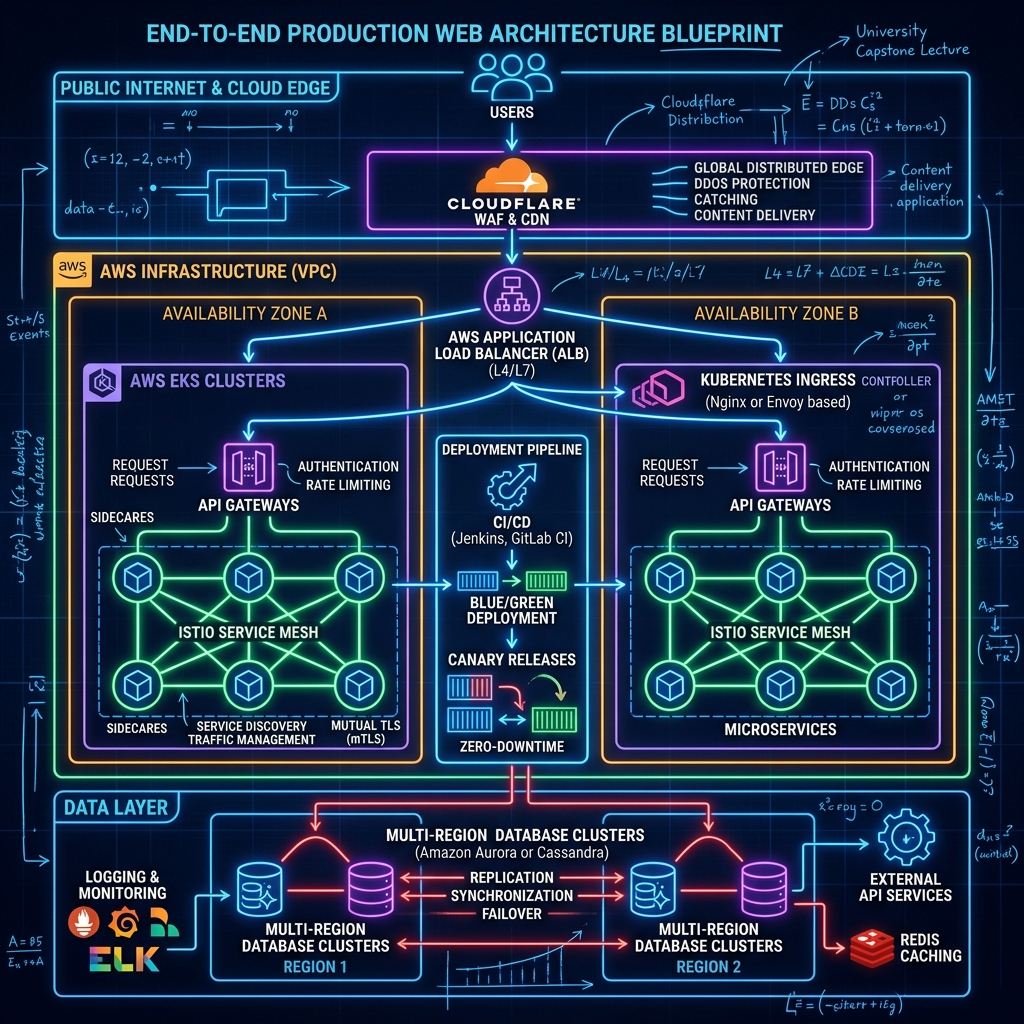
Where does every component actually sit in a production network? Here is the complete end-to-end blueprint:
| |
The Component Distinction Matrix
| Component | Primary OSI Layer | Main Purpose | Can Nginx do this? |
|---|---|---|---|
| Web Server | Layer 7 | Serves static assets off disk; handles raw HTTP protocols. | Yes (Native core) |
| Reverse Proxy | Layer 7 | Hides backend IPs; handles TLS termination & header rewriting. | Yes (Native proxy_pass) |
| Load Balancer | Layer 4 or 7 | Distributes incoming traffic across a pool of backend servers. | Yes (Native upstream block) |
| API Gateway | Layer 7 | Edge authentication, rate limiting, request transformation, BFF. | Yes (With Lua/OpenResty/Modules) |
| Ingress Controller | Layer 7 | Entry point for Kubernetes clusters mapping HTTP routes to K8s Services. | Yes (Nginx Ingress Controller) |
| Service Mesh | Layer 4 & 7 | East-West (service-to-service) internal mTLS, telemetry & retries. | No (Handled by Envoy / Istio) |
2. Evolutionary Architecture: Monolith to Microservices
You should never start a project with microservices, Kubernetes, and an API gateway on Day 1. That is over-engineering. Architecture must evolve as your user base and engineering team grow:
| |
When to introduce each component?
- Reverse Proxy (Nginx): Day 1. Always put Nginx in front of any backend app.
- Load Balancer: When a single VPS hits 70% CPU during peak hours or when you require 99.9% uptime (fault tolerance against server hardware failure).
- API Gateway: When you split your monolith into 3+ independent microservices, or when mobile and web teams require separate client APIs (BFF pattern).
3. Real-World System Design & Operational Scenarios
Let’s work through 10 high-frequency system design and troubleshooting scenarios that senior engineers encounter in technical interviews and production post-mortems.
Scenario A: Zero-Downtime Deployments behind a Load Balancer
Question: How do you deploy a new backend version without dropping active user requests?
Answer: Use Blue-Green Deployment or Canary Release:
| |
Scenario B: Diagnosing 502 Bad Gateway vs. 504 Gateway Timeout
Question: Users report intermittent errors. How do you distinguish a 502 from a 504?
- 502 Bad Gateway: Nginx could not reach the backend socket (backend process crashed, out of memory OOM, or bound to wrong port).
- Fix: Check backend service status (
systemctl status fastapi), verify socket permissions, inspect OS kernel OOM killer logs (dmesg -T).
- Fix: Check backend service status (
- 504 Gateway Timeout: Nginx reached the backend, but the backend didn’t answer before
proxy_read_timeoutexpired.- Fix: Backend is suffering from slow DB queries, thread pool exhaustion, or external API blocking calls. Inspect database slow query logs and application trace spans.
Scenario C: Preventing Retry Storms & Duplicate Payments
Question: A user clicks “Pay $100”. Network stutters, the gateway times out, and the mobile app automatically retries 3 times. How do you prevent charging the user $300?
Answer: Enforce Idempotency Keys:
| |
Scenario D: Protecting /login from Brute-Force Attacks
Question: How do you protect authentication endpoints from automated password-guessing bots?
Answer: Implement Distributed Rate Limiting + Fail2ban at the Gateway:
- Nginx / Gateway Rate Limit: Restrict
/loginrequests to5 req/minper IP using a Leaky Bucket directive (limit_req_zone). - Redis Distributed Counter: Track failed login attempts per username across all gateway nodes. If
failed_attempts > 5in 15 minutes, lock the account temporarily and trigger CAPTCHA verification.
Scenario E: What Happens When the Gateway or Load Balancer Dies?
Question: If the Load Balancer is the single entry point, how do you prevent it from being a Single Point of Failure (SPOF)?
Answer:
- Cloud Environments: Use managed load balancers (AWS ALB/NLB) which run across multiple Availability Zones (AZs) with auto-healing managed control planes.
- Bare-Metal / VPS: Run pairs of load balancers using VRRP / Keepalived with a shared Virtual IP (VIP), or use BGP Anycast routing across multiple datacenters.
Classroom Conclusion & Final Remarks
Congratulations, everyone! You have completed the Systems Architecture series.
Let’s summarize the journey we took together:
- Level 0: Mastered Sockets, Ports, DNS, and Web vs Application Servers.
- Level 1 & 2: Configured Nginx Reverse Proxies, TLS Termination, Header Forwarding, and Debugged 502/504 errors.
- Level 3 & 4: Built Load Balancing strategies (L4 vs L7), Consistent Hashing, and Stateless Architectures with Redis.
- Level 5 & 6: Designed API Gateways with Edge Auth, Token Bucket Rate Limiting, Circuit Breakers, and Distributed Tracing.
- Level 7 & 8: Assembled End-to-End Enterprise Production Blueprints, Blue-Green deployments, and Idempotency patterns.
You now possess the theoretical foundation and practical blueprint required to design, build, and debug high-performance production web systems.
Go build incredible, resilient systems. Class dismissed!