Welcome back, everyone. Take your seats.
Today we are kicking off our deep-dive series on modern backend engineering and infrastructure architecture. Before we talk about Kubernetes, load balancers, or fancy service meshes, we must build an unshakeable understanding of fundamental web mechanics.
If you don’t understand what actually happens at the OS and network level when a user clicks a button on a web page, you will spend your entire career Cargo-culting configuration files and scratching your head during production outages.
So let me strip away the magic. Grab your notebook, and let me examine the foundations of web systems architecture.
1. The Client-Server Model & Life of a Request
Let’s start with the baseline paradigm: Client-Server Architecture.
In software engineering, client-server is a distributed application structure that partitions tasks or workloads between service providers (servers) and service requesters (clients).
| |
- The Client: Usually a web browser (Chrome, Firefox), a mobile application, or a CLI tool like
curl. It initiates communication by asking for a resource or sending data. - The Server: A machine (or software process) that waits passively for incoming network connections, processes requests, and returns responses.
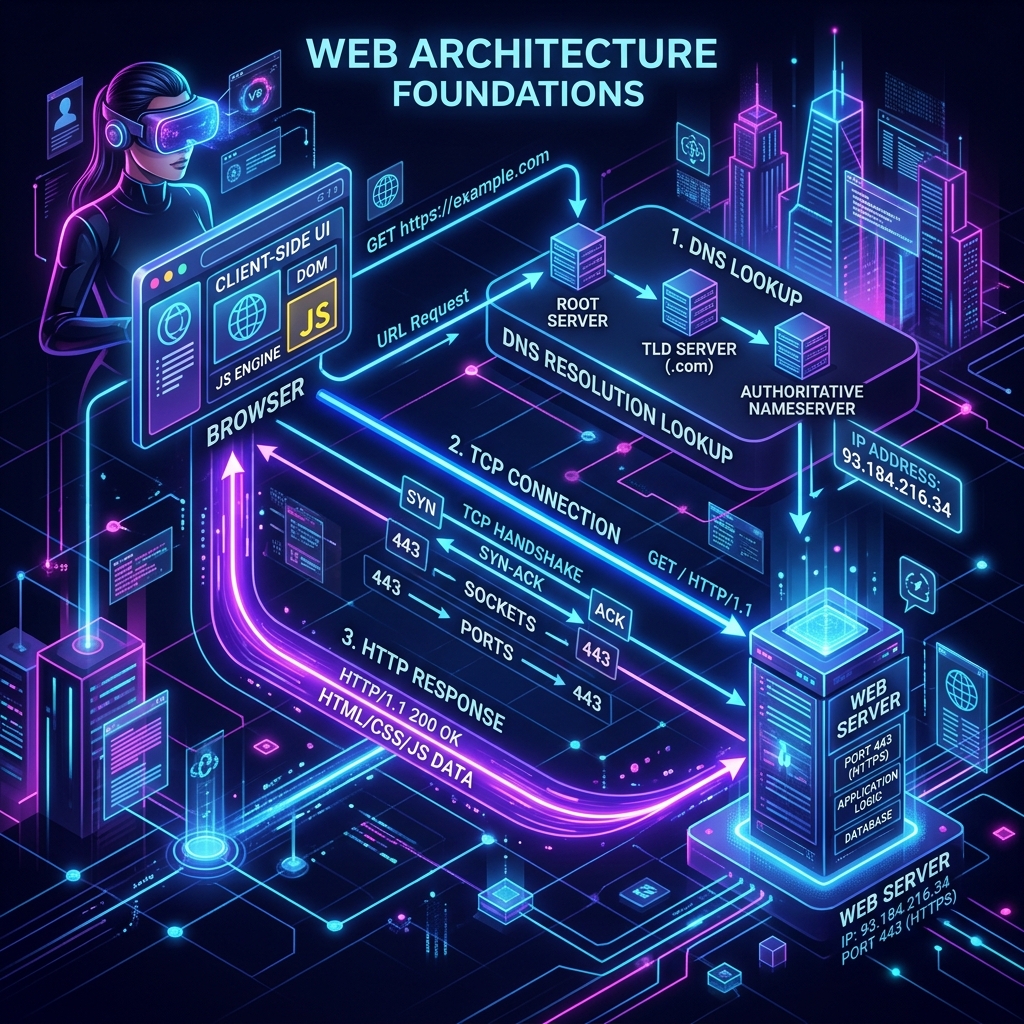
What Happens When You Type https://example.com into a Browser?
This is a classic software engineering interview question, but more importantly, it tests your holistic understanding of networking. When a user hits Enter, a precise chain of events triggers:
| |
- URL Parsing & Protocol Identification: The browser parses
https://example.com, recognizing the protocol (https://), domain name (example.com), and implicit default port (443). - DNS Resolution: The computer needs an IP address (e.g.,
93.184.216.34). The browser checks its local cache, OS cache, router cache, and finally queries a Recursive DNS Resolver. - TCP Connection (3-Way Handshake): The browser opens a socket to port 443 at IP
93.184.216.34. The OS executes the TCP handshake:SYN$\rightarrow$SYN-ACK$\rightarrow$ACK. - TLS Handshake: Because the protocol is
HTTPS, the client and server negotiate encryption keys, exchange cryptographic certificates, and verify host identities. - HTTP Request Transmission: The browser sends an HTTP request payload over the encrypted TCP connection (e.g.,
GET / HTTP/1.1\r\nHost: example.com...). - Server Processing & Response: The server receives the bytes via socket buffers, processes the request (executing business logic or fetching static files), and writes an HTTP response back (
HTTP/1.1 200 OK). - Client Rendering: The browser receives HTML, parses the document tree (DOM), requests secondary assets (CSS, JS, images), executes JS, and renders the UI.
2. Dissecting URLs, Hostnames, IPs, Ports, and Sockets
Students often mix up these terms. Let’s make the distinctions crystal clear.
| Term | What it is | Real-world Physical Analogy |
|---|---|---|
| IP Address | The numerical network address of a machine on the internet (e.g., 192.168.1.1 or 93.184.216.34). | The street address of an apartment building. |
| Port | A 16-bit integer (0–65535) identifying a specific process on that machine. | The apartment number inside the building. |
| Hostname | A human-readable name that maps to an IP address (e.g., api.example.com). | The name of the building (“Empire State Building”). |
| URL | Uniform Resource Locator: host + port + path + query parameters + protocol (https://example.com:8080/users?id=5). | The complete mailing instructions to deliver a letter to a specific person. |
| Socket | An OS file descriptor representing an endpoint bound to an IP + Port pair (192.168.1.1:443). | The actual telephone plug in the wall connected to a phone line. |
What does it mean for a server to “listen” on a port?
When you run a backend application (say, Python’s FastAPI or Node.js), the program makes system calls to the operating system kernel:
socket(): Requests a network socket file descriptor.bind(IP, Port): Tells the kernel “associate this socket with IP0.0.0.0and Port8000”.listen(): Tells the kernel “accept incoming TCP connections on this socket and queue them up”.
When a server is “listening,” the OS kernel handles the raw TCP packets in the background. When a client connects, the OS places the established socket in an accept queue for your application code to read.
Exposing a Port to the Internet
When you expose a port, you configure your network interface and firewall (e.g., AWS Security Group, ufw, or router port forwarding) to allow external IP addresses on the public internet to reach that listening socket port. If a port is bound to 127.0.0.1 (localhost), it is strictly private to the machine. If it is bound to 0.0.0.0 (all interfaces) and the firewall allows incoming traffic, it is publicly exposed.
3. Protocols: HTTP vs. HTTPS & DNS
HTTP (Hypertext Transfer Protocol)
HTTP is an application-layer request-response protocol running over TCP. It is completely plaintext. Anyone eavesdropping on the network path (Wi-Fi router, ISP, transit provider) can inspect, alter, or inject data into your traffic.
HTTPS (HTTP Secure)
HTTPS is standard HTTP wrapped inside TLS (Transport Layer Security) encryption.
| |
HTTPS guarantees three fundamental security principles:
- Confidentiality: Payload is encrypted; eavesdroppers see only random bytes.
- Integrity: Data cannot be tampered with in transit without detection.
- Authentication: Digital certificates issued by Certificate Authorities (CAs) prove that the server actually owns the requested domain.
DNS (Domain Name System)
DNS is the internet’s phonebook. It translates human-friendly hostnames (example.com) into machine-routable IP addresses (93.184.216.34). It operates primarily over UDP port 53 for quick request-response lookups.
4. The Server Hierarchy: Web Server vs. Application Server vs. Backend
One of the biggest sources of confusion for junior engineers is distinguishing between Web Servers, Application Servers, and Backend Servers.
| |
1. Web Server
A software application dedicated to handling HTTP protocols, serving static files directly from disk, managing TLS certificates, and forwarding dynamic requests. Examples: Nginx, Apache HTTP Server, Caddy.
2. Application Server
A runtime engine designed to execute dynamic programming code and business logic (Python, Java, Ruby, JS). It translates incoming raw HTTP payloads into programmatic objects (e.g., Python dict or Express req/res objects).
Examples: Gunicorn / Uvicorn (Python), Puma (Ruby), Tomcat (Java), Node.js runtime.
3. Backend Server
A broader architectural term encompassing everything behind the user-facing tier—including application servers, background worker queues (Celery, BullMQ), microservices, and databases.
5. Why Can’t You Expose Your Application Server Directly to the Internet?
Students frequently ask me: “Professor, my FastAPI/Node.js app has a built-in server. Why can’t I just bind it to port 80/443 on my VPS and expose it directly?”
Technically, you can, but in production, this is an architectural sin. Here is why:
- Slow Client Attacks (Slowloris): Application servers (like Gunicorn or Node.js event loops) are optimized for complex business logic, not holding open thousands of idle connection threads. An attacker sending 1 byte every 10 seconds can quickly exhaust all worker threads, taking your app offline.
- Poor Static Asset Performance: Application servers execute code to serve files. Reading a static
logo.pngoff disk via Python or JS is 10x to 100x slower and consumes vastly more CPU/RAM than Nginx serving it using OS zero-copysendfile()kernel calls. - Security & Privilege Escalation: Binding to ports below 1024 (like port 80 or 443) requires root privileges on Linux. Running your application code (FastAPI/Node) as root means any Remote Code Execution (RCE) vulnerability gives the attacker full control of your server.
- Lack of Robust TLS Management: Application runtime TLS stacks are rarely as optimized, battle-tested, or easily automated (via Certbot) as dedicated web servers like Nginx.
- No Zero-Downtime Reloads: Modern web servers can reload their configuration and worker processes without dropping a single active TCP connection. Application runtimes typically require restarting the whole process.
Classroom Recap & Concept Check
Let’s review what we learned today:
- Client-Server: Clients request, servers listen on TCP sockets.
- Port vs IP: IP is the machine’s address; Port is the process doorway.
- DNS & Sockets: DNS translates hostnames to IPs; Sockets are the OS file handles for networking.
- Web vs App Server: Web servers (Nginx) handle HTTP/TLS/Static files blazingly fast; App servers (Uvicorn/Gunicorn) run business logic.
- Exposure: Never expose app servers directly; place a dedicated web server or reverse proxy in front.
In our next lecture, we will take this foundation and explore Reverse Proxies & Nginx Implementation in depth. Class dismissed!